Goals
Goals
A goal is a decision about what matters.
Everything else in the app — subjects, rituals, tasks, sessions — is about how you spend your time. Goals are about why. They are the layer where you decide what your effort is for, and the layer where the app measures whether your time is actually going there.
They are optional. The app works without them. But if you use them, they change the character of everything else.
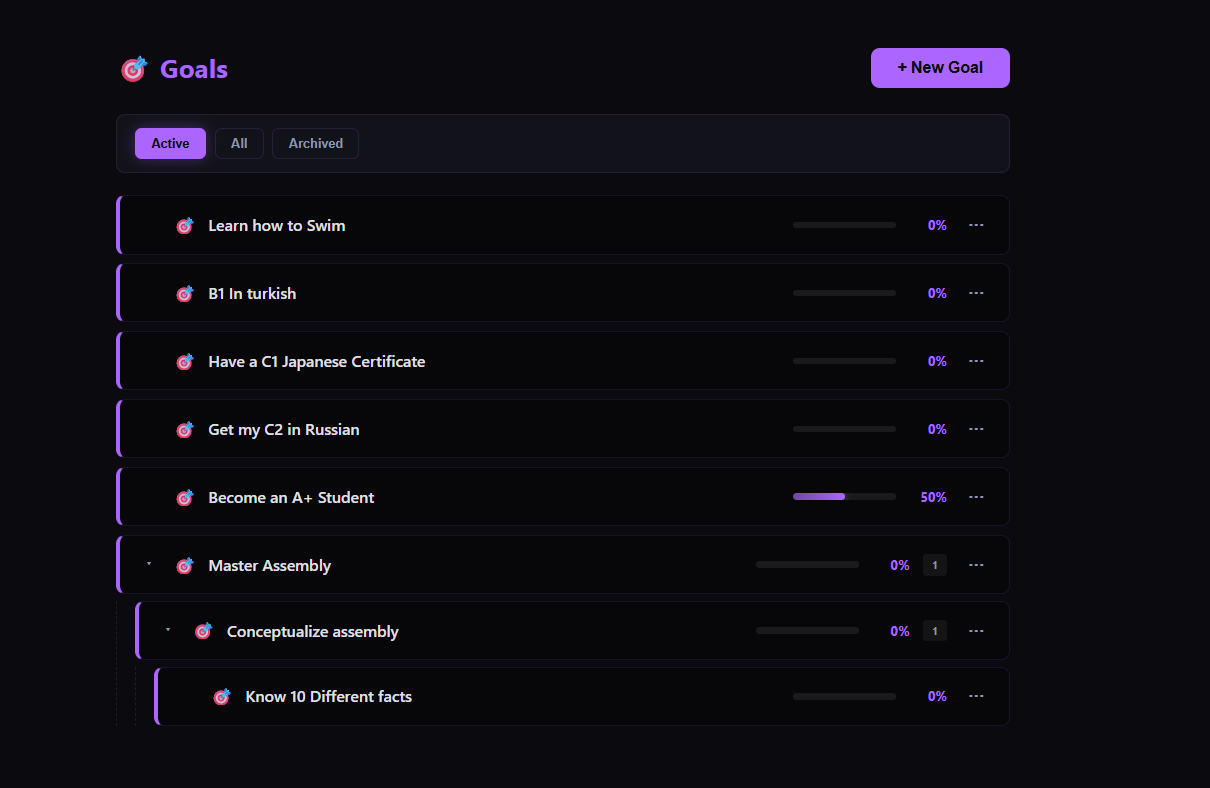
What a goal is
A goal is a thing you want to have achieved at some point in the future. It has a title and an optional description. It does not have a deadline (though it can), and it does not have a fixed size. Goals are declarative, not prescriptive — they say what you want, not how you will get there.
Examples:
Master AssemblyBecome an A+ StudentGet my C2 in RussianLearn how to Swim
A goal can be as broad or as specific as you want. The app does not judge the scope. It only asks whether you want to link tasks to it.
Sub-goals
A goal can be broken into sub-goals — smaller outcomes that, when achieved together, complete the parent.
For example:
- Master Assembly (root)
- Conceptualize assembly (sub-goal)
- Know 10 different facts (sub-sub-goal)
Sub-goals are optional. A goal can be a single flat thing, or a tree two or three levels deep. The app supports both.
There is one rule: a goal is either a leaf or a parent, never both. A leaf goal has linked tasks and no sub-goals. A parent goal has sub-goals and no linked tasks. The app enforces this because the two are fundamentally different — a leaf is measured by task completion, a parent is measured by its children.
If you try to add a sub-goal to a goal that already has linked tasks, the app will refuse. If you try to link a task to a goal that has children, it will also refuse. The reason is simple: two measures of progress on the same goal would contradict each other.
Linking tasks to goals
This is the important part.
A task — whether it is a ritual, a deviation, or an independent task — can be linked to a goal. The link is the app's way of saying *"this task is part of that outcome."*
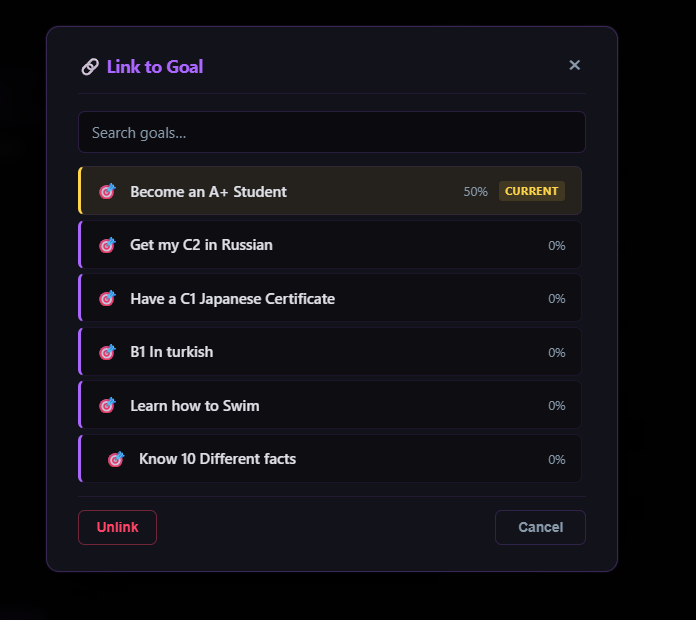
When a task is linked:
- A small 🏆 appears on the task everywhere it is shown — in the calendar, in the task detail view, in the library.
- The task becomes signal. Unlinked tasks are noise.
- The goal's progress is recalculated, because it now has one more linked task.
Linking is done from the Task view. Click Link to Goal, choose a goal from the picker, and confirm. If the task is already linked to a different goal, the app asks whether you want to replace the link. Unlinking is a single click from the same menu.
A task can only be linked to one goal at a time. The link is a decision: this task is for this outcome, not that one.
Progress
Goal progress is calculated automatically. How it is calculated depends on whether the goal is a leaf or a parent.
Leaf goals measure progress by their linked tasks:
completed tasks / total linked tasks × 100
If a leaf goal has five linked tasks and three are complete, progress is 60%.
Parent goals measure progress by their sub-goals:
completed sub-goals / total sub-goals × 100
If a parent goal has four sub-goals and two are complete, progress is 50%.
Progress cascades upward. When you complete a task linked to a sub-goal, the sub-goal's progress updates, and the parent's progress recalculates from that. The app handles the cascade automatically.
Completion and archiving
When a goal reaches 100%, two things happen:
- The goal's status becomes
completed, and the app records the completion date. - The goal is archived — it moves out of the main goal list, into the archived view, where it stays as a permanent record.
If the progress later drops below 100% (because a linked task was uncompleted, or a sub-goal was reopened), the goal is automatically unarchived and its status returns to in_progress. The app does not leave a goal in a completed state that is no longer true.
You can also archive a goal manually. Archiving is not the same as completing — an archived goal that was never completed is still a goal that was put aside.
The goal detail page
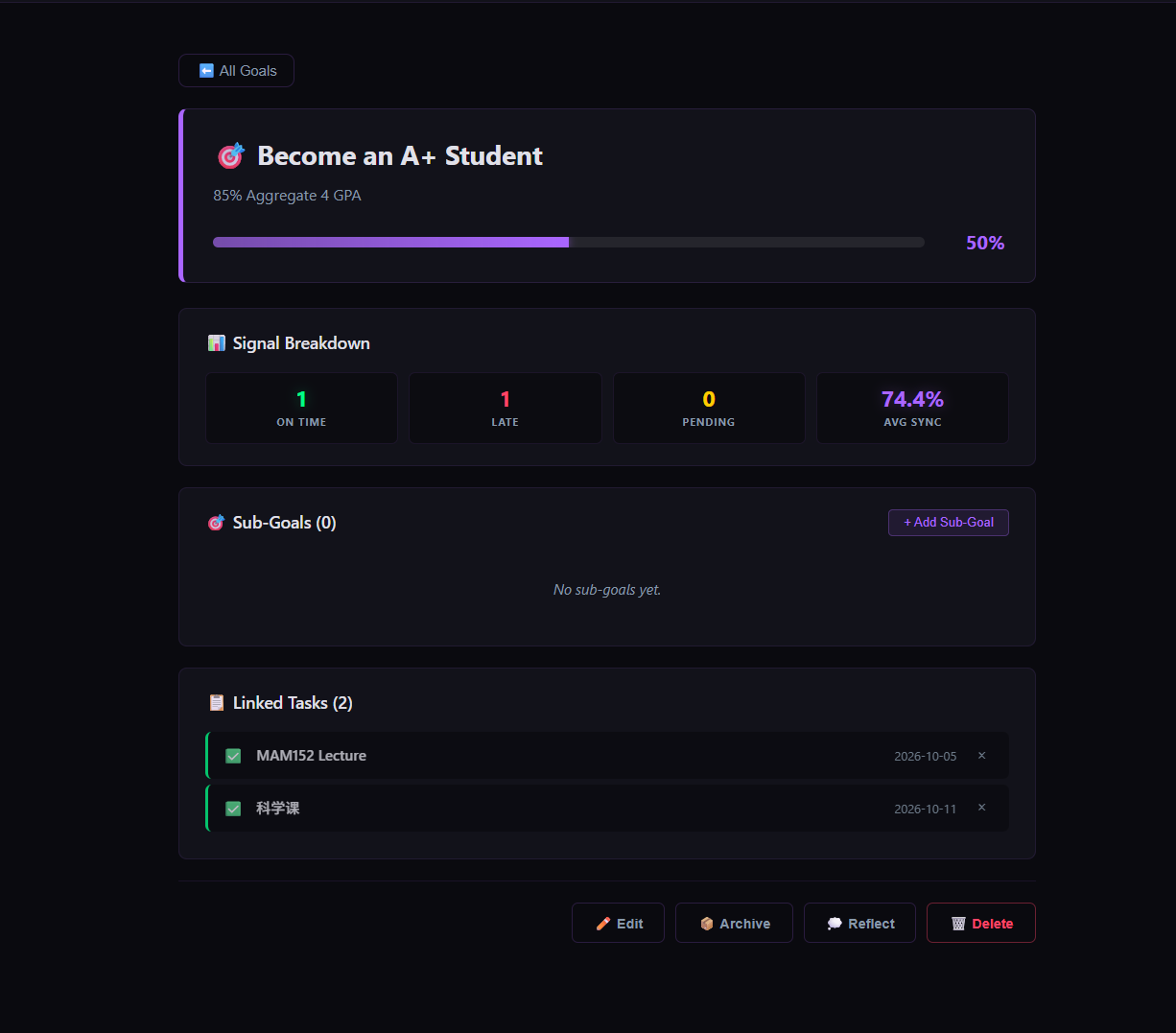
Clicking any goal opens its detail page. This is the full view of a goal: its progress, its children, its linked tasks, and its controls.
The page is organized into sections:
- Header — title, description, and a progress bar.
- Signal Breakdown — how the linked tasks have gone: how many were on time, how many late, how many still pending, and the average sync percentage across them.
- Sub-Goals — if the goal has children, they are listed here. Each child shows its own progress.
- Linked Tasks — if the goal has tasks, they are listed here with their dates and completion state.
- Actions — edit, archive (or restore), reflect, or delete.
Signal leaders
On the dashboard, the top three goals by completions this month appear as Signal Leaders. This is not a ranking of importance — it is a ranking of activity. The goal you completed the most tasks for this month appears at the top, followed by the next two.
Signal Leaders is a mirror, not a prize. It shows you where your time actually went, which may not be where you intended it to go.
Why goals matter
Without goals, the app still works. You can schedule subjects, complete tasks, and see the shape of your week.
But without goals, the app cannot tell you whether your time is going where you meant it to. A task is only signal if it is linked to something. A week full of completed tasks that are not linked to anything is a week of noise — well-executed, perhaps, but unmoored.
Goals are how the app gives you a language to notice this. Not to judge it — some noise is fine, some weeks are meant for maintenance — but to notice it.
> A task completed is effort. A task completed in service of a goal is direction.