Reflections
Reflections
Reflections are where the app stops showing and starts asking.
Everything else in the app is a record of what you did. Reflections are the place where you tell it, in your own words, what it meant. They are the difference between a calendar and a diary — the same events, seen twice, once from outside and once from within.
Why reflection is part of the app
Most productivity software has no memory of how it felt.
You plan a week, you execute it (or you do not), and the app has nothing to say about how it went. It knows you completed six tasks. It does not know that one of them drained you, one surprised you, and one you would do differently next time.
Reflection is how the app gives you a place to record those things. Not as a formal review — no scores, no ratings, no checkboxes — but as open-ended writing in your own voice.
The belief behind it is simple: the value of an experience is not in what happened. It is in what you notice about it. The app already knows what happened. Reflection is where you add the noticing.
The four scopes
Reflections can be written at four different scopes, and each answers a different kind of question.
- Daily — a reflection on a single day. Two questions, written in the evening or the next morning.
- Weekly — a reflection on the past seven days. Three questions, written at the end of the week.
- Monthly — a reflection on the past month. Three questions, written at the turn of the month.
- Session — a reflection on a single task. Two questions, written immediately after the task is completed.
- Goal — a reflection on a goal. Two questions, written whenever you want to think about a goal's arc.
The session and goal scopes are entity-scoped: each reflection is attached to a specific session or goal, and can be reached from that entity. The daily, weekly, and monthly scopes are time-scoped: each reflection is attached to a specific date, and stands on its own.
The questions
Each scope has a fixed set of questions. The questions are not configurable — they are the app's, not yours. But they are open-ended enough that the answer is always yours to write.
Daily:
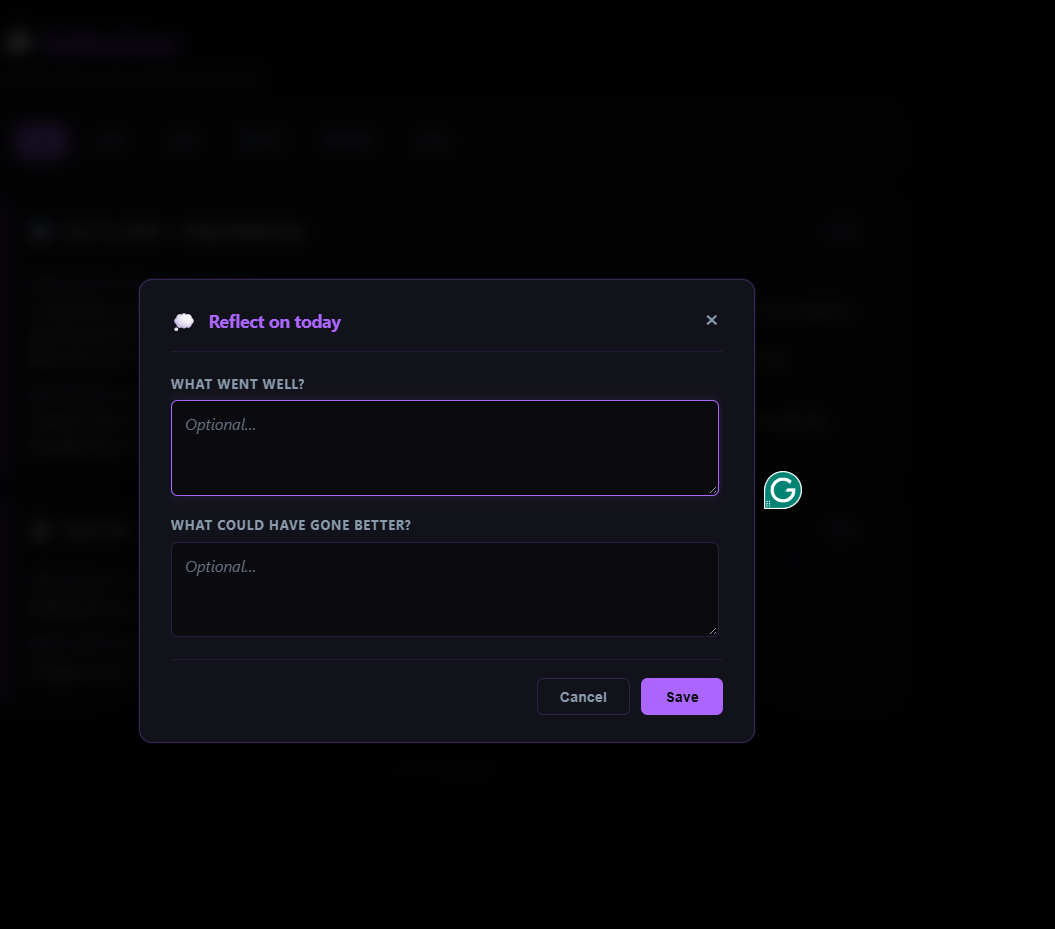
- What went well?
- What could have gone better?
Weekly:
- What was your biggest win?
- What drained your energy?
- What pattern do you notice?
Monthly:
- What did you learn?
- What would you do differently?
- What are you proud of?
Session:
- What happened?
- What would you change?
Goal:
- What did you learn?
- What pattern do you notice?
That is the whole question bank. Twenty questions across five scopes. The app does not invent new ones, does not rotate them, and does not change them based on your answers. They are stable, patient, and they wait.
How to reflect
Reflection is opened from the floating 💭 button in the bottom-right corner of every authenticated page. Clicking it opens a small menu with five options, one for each scope.
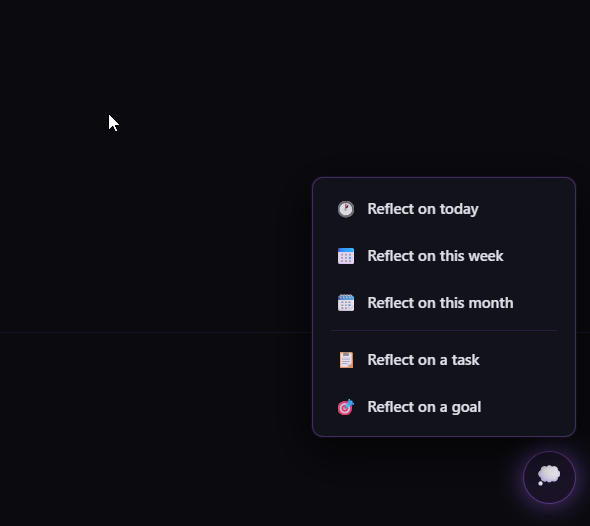
For time-scoped reflections (daily, weekly, monthly), the menu opens the reflection directly. For entity-scoped reflections (session, goal), the menu opens a picker — a list of recent sessions, or all active goals — and clicking an entry opens the reflection on that entity.
Each reflection is written in a modal. The modal shows the questions in order, each with a text area. Answers are optional — you can answer one question and leave the others blank, or answer all of them, or close the modal without writing anything.
Drafts are saved automatically. As you type, the app stores your answers in the browser and restores them if you close and reopen the modal. Drafts expire after seven days. If you navigate away by accident, nothing is lost.
Reading your reflections
The reflections page (💭 Reflections in the navigation) is where all your written reflections live.
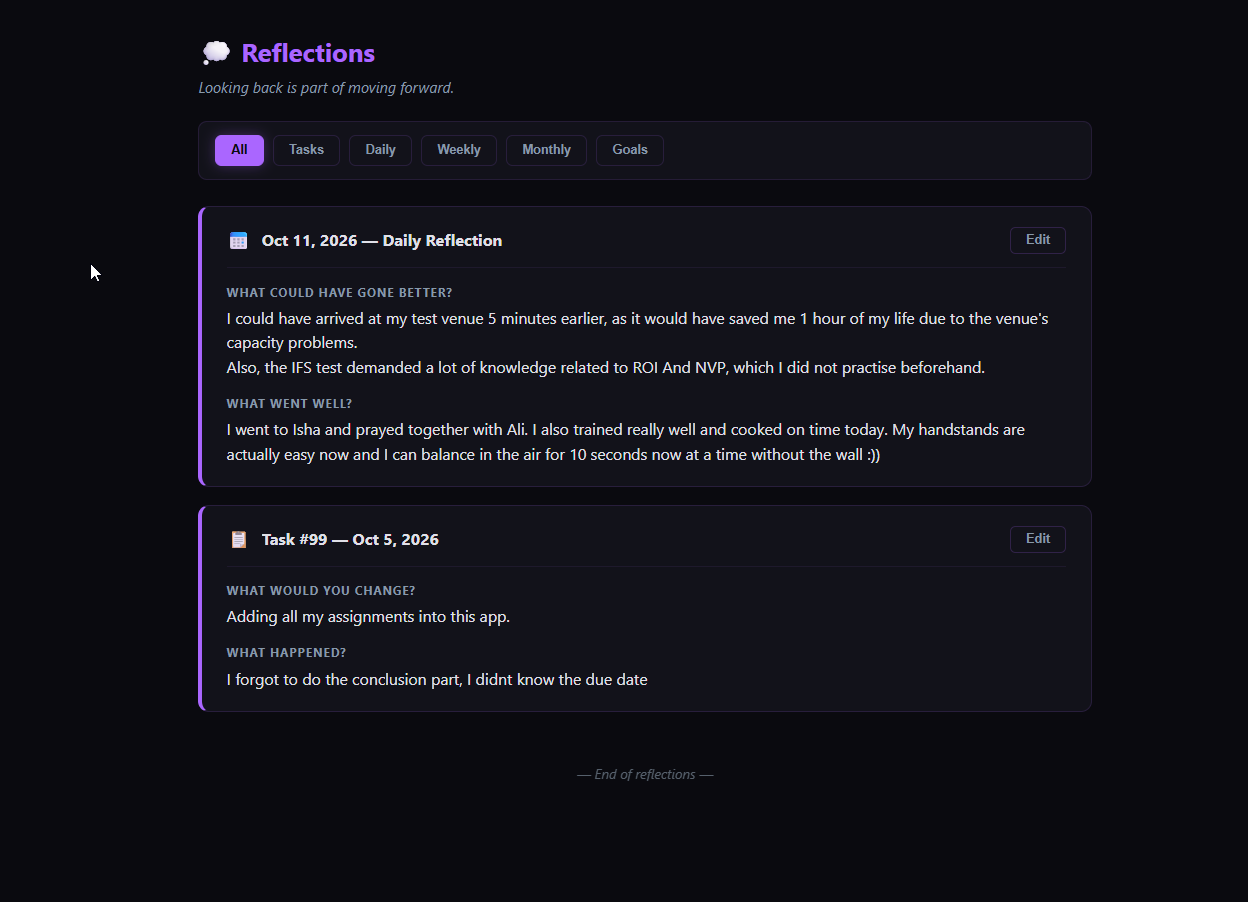
Reflections are grouped into cards. Each card corresponds to one logical entity — a day, a week, a month, a task, or a goal — and contains all the entries written for that entity. A day with two answers shows one card with two entries. A goal with ten reflections shows one card with ten entries.
Cards can be filtered by scope — all, tasks, daily, weekly, monthly, or goals. The list is paginated as you scroll.
Any reflection can be edited in place. Click Edit on a card, change any answer, and save. The original question is preserved — you are editing your answer, not the prompt.
What reflections do in the app
Reflections are not decoration. They feed into three other parts of the app.
Streaks. A day on which you wrote at least one reflection counts as a day of activity, exactly as a completed task does. Writing a reflection keeps your streak alive on a day you did not complete any task. This is deliberate — reflection is a first-class form of engagement, not a secondary one.
The dashboard. A small widget on the dashboard shows your last reflection and how many you have written this week. It is quiet, and it does not nag.
Your own history. Over time, the reflections you write become the most valuable record in the app. Longer than any task, more honest than any metric, they tell you not what you did but who you were while doing it.
The philosophy
The app's reflection system is designed around three principles.
Reflection is voluntary. The app does not force it, does not schedule it, does not remind you. The 💭 button is always visible; it never pulses or badges. It waits.
Reflection is open. No scales, no multiple choice, no "how do you feel from 1 to 5." The questions are open-ended because your answers should be too.
Reflection is private. Nothing you write is shared, compared, or counted against you. The reflections you write are yours and no one else's. Even the streaks that reflections contribute to are private — the leaderboard does not track them separately.
> The app asks, but never demands. It is patient. It will still be here when you are ready.